Intellifi by Adtran®
- 4.2
- Rating
- 10.00K
- Installs
- Free
- Price

 Analysis by App-foxy
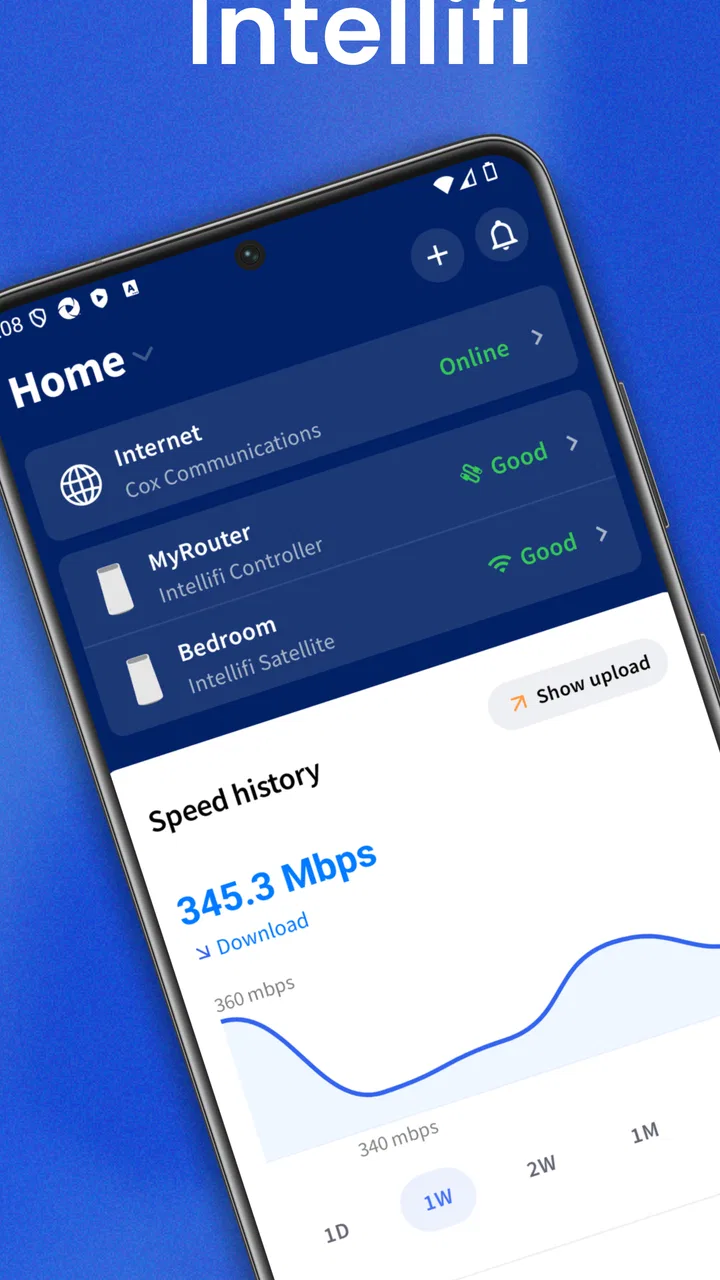
When I first opened Intellifi, I understood the appeal almost immediately: it is designed to make a home Wi-Fi system feel less mysterious. Instead of treating the router as a box that only matters when something breaks, the app turns network management into something I can check from my phone. That is a useful idea for anyone who has dealt with a slow room, a dropped connection, or a family member asking why the internet suddenly feels unusable.
My overall impression is positive, but not because a Wi-Fi assistant is exciting every day. Its real test is whether it remains useful after the first week, when the curiosity fades. In my experience, this kind of app earns its place when it helps me understand recurring problems without making me become the household network technician. Intellifi comes close to that goal, especially for homes using compatible equipment from ADTRAN Holdings, Inc., but its long-term value depends heavily on how often I actually need to inspect or adjust the network.
It is a free House & Home app for everyone, with a 4.3 average from around 128 ratings and over 10,000 installs. Those figures suggest a modest but real user base rather than a service I would assume every household already knows. It first appeared on May 31, 2023, and the current release is version 6.26.0 for devices running Android 7.0 or later.
You May Also Like

 AccuWeather: Weather Radar
AccuWeather Review: A Quick, Clear Forecast for Everyday Decisions
For everyday plans, the best forecast is the one you can understand quickly. AccuWeather makes rain timing, radar, and local conditions easy to act on, with a few trade-offs.

 Hill Climb Racing
Why Hill Climb Racing Still Turns Crashes Into One More Run
A tiny car, a bumpy hill and one more upgrade: Hill Climb Racing keeps resurfacing because its simple chaos makes every near-miss feel personal.

 AliExpress - Shopping App
AliExpress Makes Global Shopping Feel Personal, but Shoppers Bear the Risk
AliExpress turns a global marketplace into a pocket-sized discovery engine. Its reach is useful, its shopping loop compelling, and its trade-offs easy to miss.

 Lords Mobile: Kingdom Wars
Lords Mobile Is a Kingdom-Building Routine, Not a Quick Match
A case-by-case verdict on the building, battles, device demands, and social commitments that make Lords Mobile rewarding for some players and exhausting for others.

 PDF Scanner app - TapScanner
TapScanner Makes Paperwork Easier to Capture, Check, and Share
TapScanner makes scanning with a phone feel less like a rescue operation and more like a dependable step in getting work done. Its capture tools are useful, though not flawless.

 Block Blast!
 Shows How Much a Puzzle Game Can Leave Out
A quiet grid game shows why puzzle players increasingly value instant clarity, repeatable skill and low-pressure play—and where the genre still needs to catch up.
More From Our News Desk
View All News


Why the first week feels more useful than a normal router app
The first week is where Intellifi makes its strongest impression. A standard router interface often feels like a technical control panel built for people who already understand networking. Even when it offers useful information, the language and layout can make simple questions feel unnecessarily complicated. Intellifi approaches the home network from the user’s side: I want to know whether the connection is healthy, whether a device is behaving oddly, and whether the problem is inside my home or somewhere beyond it.
That change in viewpoint matters. I do not need to remember a router address or sit in front of a computer to begin investigating a problem. A phone-based assistant is more practical when I am standing in a bedroom with a weak connection, checking the television before a movie, or helping someone else in the house reconnect a device. The app’s value is not just the information it presents; it is the fact that the information is available where the problem is happening.
A realistic everyday situation would be a video call that repeatedly becomes unclear in one part of the home. With a conventional setup, I might restart the router, move closer to it, or blame the internet provider without knowing which part of the connection is responsible. Intellifi gives me a more organized place to begin. I can use the app to look at the home network as a whole before making random changes. That encourages a better habit: observe first, then troubleshoot.
I also like the possibility of using it as a communication tool with other people in the household. Not everyone wants to hear about wireless bands, signal behavior, or router settings. A mobile assistant can turn a vague complaint such as “the Wi-Fi is bad” into a more focused conversation about a particular device, room, or time of day. That is a small but meaningful advantage for families, shared homes, and anyone who provides informal technical support to relatives.
Still, the first-week experience can create expectations that the app cannot always meet. A network assistant can show and organize the situation, but it cannot magically improve a poor broadband plan, repair damaged cabling, or overcome every physical obstacle between a router and a device. I found it most useful when I treated it as a diagnostic companion rather than an automatic cure.
The right setup mindset
The best way to approach the app is to use it during a calm period, not only during a crisis. I would open it when the network is working normally and learn what the household’s usual pattern looks like. That gives me a reference point for later. If I wait until everyone is offline and frustrated, I am more likely to make hurried changes or mistake a temporary issue for a permanent one.
Another practical tip is to check the app after adding an important device rather than assuming the connection is settled. A new television, camera, printer, or smart-home product can become the source of confusion later. Reviewing the network while I still remember what was added makes future troubleshooting less like detective work.
This is also where Intellifi differs from a generic speed-test utility. A speed test can tell me how fast a connection appears at one moment, but it does not necessarily help me understand the shape of the home network. Conversely, a router’s built-in web interface may expose more technical controls but require more patience. Intellifi sits between those two approaches: more useful for ongoing home awareness than a single test, and more approachable than many administrative dashboards.
What remains valuable after the novelty fades
After the initial exploration, the app’s month-to-month value becomes quieter. I am not opening it for entertainment, and I would not expect to use it every day when the home network is stable. That is not a weakness by itself. Good household tools often disappear into the background until they are needed. The question is whether Intellifi provides enough clarity during those occasional moments to justify keeping it installed.
For me, the answer is yes when the home has several connected devices or when different people rely on the network for work, school, streaming, and smart-home routines. The more complicated the household becomes, the more useful a shared view of the network can be. A single person with one phone and a simple internet setup may rarely need it, while a family with devices spread across several rooms has more reasons to return.
The recurring benefit is mostly preventive. Instead of waiting for a complete outage, I can use a network assistant to notice patterns in my own experience. If the same room repeatedly has trouble, that points toward placement or coverage. If one device is consistently unreliable while others work normally, the device itself deserves attention. If every device struggles at the same time, the problem may be broader. This kind of separation saves time because it reduces the number of unhelpful fixes I try.
One non-obvious strength is that the app can support a maintenance routine without requiring a formal schedule. I might check it after changing the router’s location, after rearranging furniture around a wireless access point, or after bringing several new devices into the home. These are the moments when a network’s behavior can change even though the internet subscription remains the same. Intellifi is more valuable when I connect its use to those household changes.
There is also a useful trade-off between convenience and depth. A simplified mobile experience can help me act quickly, but it may not replace advanced tools when I need detailed network analysis. If I am trying to investigate interference, compare technical settings, or diagnose an issue that needs provider-level information, I may still need the router’s full controls or help from the internet provider. Intellifi is best as the first layer of understanding, not necessarily the final instrument for every technical question.
Who gets the most lasting value
I would recommend it most strongly to people who want more confidence managing a home network but do not want to study networking terminology. It also makes sense for households where one person normally handles all technical problems. A mobile assistant can make that responsibility less dependent on memory and less intimidating when something goes wrong.
It may be particularly useful for someone moving into a new home, changing the position of networking equipment, or gradually adding connected appliances. In those situations, a clear overview helps me build a mental map of the home’s connectivity. The app does not need to be opened constantly to be useful; it needs to be available when the household changes.
I would be less enthusiastic for a networking enthusiast who already relies on specialized monitoring tools and wants extensive technical controls. That person may find a guided mobile assistant too limited. I would also hesitate to recommend it as the only troubleshooting tool for someone whose main problem is an unreliable broadband line. The app can help identify the pattern, but the provider or physical network may still be the real solution.
Maintenance: light effort, but not completely effortless
The maintenance burden is fairly reasonable because the app is free and built around a task I already care about: keeping the home connection understandable. The main effort is not constant manual work. It is remembering to look at the network when something changes instead of treating the app as a one-time setup screen.
My preferred routine would be simple. I would check the network after installing a new connected product, after moving major furniture near the router, and whenever a recurring connection complaint appears. I would also avoid making several changes at once. If I reposition equipment, rename devices, and restart everything together, I lose the ability to tell which action helped. Intellifi is more useful when I use it to support a controlled troubleshooting process.
A second practical tip is to record the difference between a device-specific problem and a home-wide problem in my own notes, even if those notes are very brief. The app can help me inspect the current situation, but my memory of when failures occur may be just as important. “Only the upstairs television at night” is a more useful clue than “Wi-Fi sometimes fails.” Combining the app with that kind of observation produces better results than repeatedly opening it without a question in mind.
The app is also easier to keep around because it does not require me to pay for another standalone service. That matters for a household tool that may sit unused for weeks. Free access lowers the cost of keeping it available for the next problem. At the same time, free does not mean it will solve every issue automatically, so I still need realistic expectations about what a phone app can control.
Compatibility is the practical point I would check before making it part of my routine. Intellifi is associated with ADTRAN Holdings, Inc., so its usefulness depends on the home equipment and network arrangement it is intended to manage. If my setup is built around unrelated hardware, I should not assume that a polished interface will replace the manufacturer’s own tools. This is an important distinction from general-purpose diagnostic apps, which may work across more environments but usually know less about the specific home network.
Where repeated use can become tiring
The main source of fatigue is that network management is reactive by nature. When everything works, there may be little reason to open the app. When something fails, I may already be impatient and want a direct answer rather than a series of checks. That creates a tension: the app is most useful when I approach it calmly, but I am most likely to use it when the household is already annoyed.
Another possible frustration is the gap between visibility and control. Seeing a problem is valuable, but it can also make the limitation more obvious if the next step requires a separate device, a physical change, or a call to the provider. I would rather know the truth than guess, but a diagnostic result is not the same as a repair. Intellifi earns trust when it helps me narrow the cause without pretending to fix conditions outside its reach.
There is a risk of overchecking, too. It is easy to turn a home network into another dashboard that I monitor without a clear reason. I do not think the app deserves daily attention in a stable household. A better habit is event-based checking: use it after a change, during a recurring issue, or when a particular device needs investigation. That keeps it from becoming maintenance theater.
Compared with the usual alternatives, Intellifi’s advantage is convenience and home-focused context. A basic speed-test app is faster for answering one narrow question, while a provider’s support app may be better for account issues or outages beyond the home. A router’s browser dashboard may offer deeper configuration, and a specialist network scanner may reveal more technical detail. Intellifi makes the strongest case when I want a friendlier starting point that connects everyday complaints with the home network itself.
That comparison also explains when I would skip it. If my only concern is checking broadband speed, I would choose a speed-test tool. If I need to change advanced wireless settings, I would go to the router’s full administration interface. If the entire neighborhood is affected, I would contact the provider. Intellifi is not a replacement for all three; it is a practical middle layer between casual users and more demanding troubleshooting methods.
Small habits that improve the experience
I would begin by giving the app a specific job. For example, I might use it to understand why one room has repeated trouble, to identify whether a new device is connected correctly, or to create a clearer starting point before contacting support. A defined purpose prevents me from judging it unfairly as an all-purpose network repair service.
I would also avoid changing settings simply because an option exists. Home networks often become harder to understand after several unrecorded adjustments. If Intellifi presents a useful control, I would make one change at a time and observe the result before doing anything else. This is a simple workflow, but it protects me from turning a small problem into a larger one.
Finally, I would keep the app installed even during stable periods if other people in the home depend on me for support. The value is partly in readiness. When a relative calls from another room or a household device suddenly stops behaving, having the assistant already available is more convenient than searching for it while everyone waits.
My long-term verdict on keeping it installed
Intellifi earns lasting space on my phone when I treat it as a calm, accessible way to understand a compatible home network rather than as a permanent source of alerts or a magic fix. Its first-week appeal comes from making Wi-Fi feel less opaque. Its month-to-month value comes from helping me recognize patterns, check changes, and approach recurring problems in a more disciplined way.
The app is not the right choice for every situation. Technical users may want deeper tools, simple households may rarely need a dedicated assistant, and broadband outages still require the provider’s help. Those limitations are important because they define the product honestly. I would not install it expecting to eliminate every wireless problem.
For families, shared homes, and less technical users with compatible ADTRAN equipment, I think the free price makes it easy to try and sensible to keep available. Its Everyone content rating also makes it suitable as a household utility rather than an app aimed at a specialist audience. The current version, 6.26.0, gives users a contemporary release to work with, while the modest install base means I see it more as a focused tool than a universal standard.
My final recommendation is straightforward: keep Intellifi if it helps you answer practical questions about your home connection, especially after adding devices or noticing problems in one part of the house. Skip it if you already have a preferred advanced monitoring system or only need occasional speed checks. Its lasting value is not constant excitement; it is reducing guesswork when the home network stops behaving normally. That is a modest promise, but in my experience, a dependable way to begin troubleshooting is exactly the kind of utility that can justify staying installed long after the novelty disappears.
FAQs for Intellifi by Adtran®
01What platforms is Intellifi by Adtran® compatible with?
Intellifi by Adtran® is designed to work seamlessly on both Android and iOS devices. It supports a wide range of versions, ensuring that users with slightly older or the latest devices can enjoy its features without compatibility issues. Always check the app store for specific version requirements.
02What are the main features of Intellifi by Adtran®?
Intellifi offers a robust suite of features including real-time data analysis, customizable notifications, and seamless integration with smart home devices. It also provides detailed usage reports, helping users optimize their connectivity and manage their network efficiently. The user interface is intuitive, making it accessible for both tech-savvy and novice users.
03Is Intellifi by Adtran® secure for personal data?
Yes, Intellifi by Adtran® prioritizes user privacy and data security. It employs advanced encryption protocols to protect user information and prevent unauthorized access. Regular updates are provided to address any potential vulnerabilities, ensuring a secure environment for all users.
04How user-friendly is Intellifi by Adtran® for beginners?
Intellifi is designed with user-friendliness in mind, featuring a simple and intuitive interface. It includes step-by-step guides and FAQs to assist new users in navigating the app. Additionally, customer support is available to address any queries or issues, making it approachable for users of all experience levels.
05Does Intellifi by Adtran® support multi-user access?
Yes, Intellifi supports multi-user access, allowing multiple users to connect and manage the network simultaneously. This is particularly beneficial for families or office environments where several users need to access and monitor the network. Each user can have customized access levels based on their needs.
Pros
- User-friendly interface for easy navigation.
- Seamless integration with smart home devices.
- Real-time notifications enhance security.
- Energy-efficient functionality reduces costs.
- Customizable settings for personalized experience.
Cons
- Limited compatibility with older devices.
- Subscription required for premium features.
- Occasional lag in device connectivity.
- Initial setup can be time-consuming.
- Requires stable internet for optimal performance.

Intellifi by Adtran®
Gallery